Under Integrations → Connectors, you build and manage governed REST connectors. A connector is authored as a draft, optionally dry-run against the live provider, then published as an immutable version — editing a published connector creates a new draft, and the live version stays unchanged until you publish again:
Info
Enterprise licence required. Integrations is gated on an active enterprise licence. Without one the section does not appear in the admin sidebar, regardless of the signed-in user’s role.
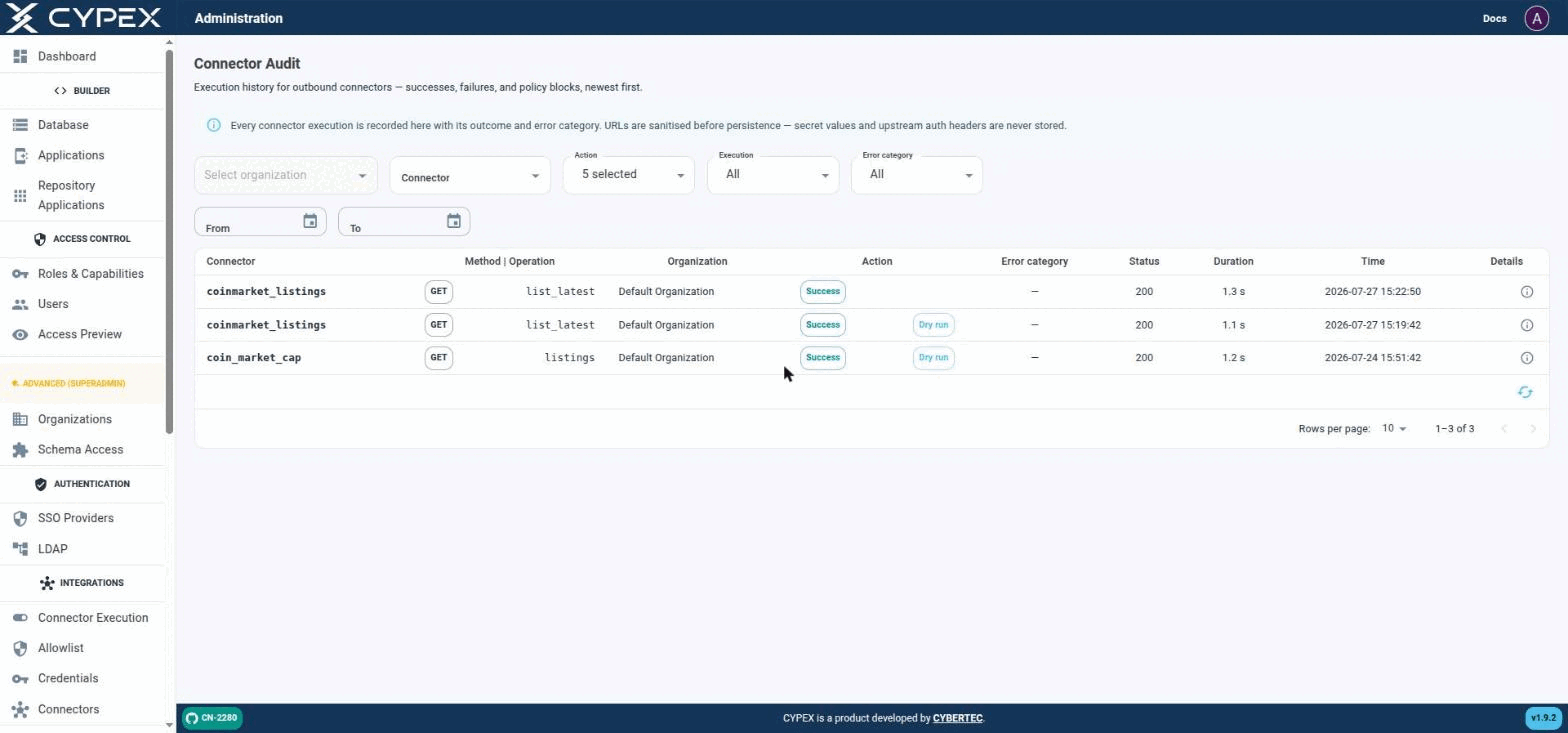
Under Monitor & Audit → Connector Audit, this page is the execution history for outbound connectors — successes, failures, and policy blocks, newest first:
Connector Audit
Live executions (no tag) sit alongside Dry run executions from the builder's Fetch sample / Test response mapping. Both are the same audit trail, distinguished only by the Dry run tag.
Filters
Organization — scope to one tenant.
Connector — scope to one connector definition.
Action — one or more of EXECUTE_STARTED, EXECUTE_SUCCESS, EXECUTE_FAILED, EXECUTE_BLOCKED, EXECUTE_RETRIED, EXECUTE_TIMEOUT.
Execution — All, Live, or Dry run. Dry run covers both the builder’s Fetch sample step and Test response mapping; Live covers real POST /connectors/:id/execute calls.
Error category — filters to one of the categories in Connectors — explicit security boundaries: configuration, schema_validation, policy_block, secret_unavailable, provider_error, timeout, internal.
From / To — date range.
Row details
Each row shows Connector, Method | Operation, Organization, Action (Success/Blocked/etc., plus a Dry run tag when applicable), Error category, Status (HTTP code), Duration, and Time. Click the Details icon for the full record:
This section contains upgrade guides for CYPEX administrators, DBAs, and
operations engineers. Use these guides when moving an existing CYPEX
deployment from one major version to the next, especially when the upgrade
involves schema or permission-model changes.
From v2.0.0 onward, multi-tenant isolation is a database property:
PostgreSQL Row-Level Security (RLS) scopes every query. Application-layer
filters are not the security boundary.
The guides are written with factual upgrade behavior in mind: what the
migrations actually do, what is additive, what is breaking, what is
behavior-changing, and what the rollback constraints are.
v2.0.0 replaces the single long-lived JWT with an access token / refresh
token pair. This page explains the model, the settings that govern it, and
the two configuration mistakes that break a deployment.
Why it matters
Under the old model a token was minted at login and stayed valid for its whole
lifetime. Deactivating a user or changing their role did nothing until that
token expired — potentially days later.
Platform Admin → Database Migrations is the in-app runner for CYPEX’s own
framework schema migrations — the changes CYPEX applies to its internal
cypex schema when the platform is upgraded.
This screen is System Administrator only (system admin visibility).
Info
This is not where you migrate your data model. Changes to your own tables
are made in Database.
Relationship to the upgrade guides
The in-app runner applies migrations. It does not tell you whether it is safe
to apply them, what they change, or how to verify the result — that is what the
upgrade documentation is for. For v2.0.0 specifically, run the upgrade from
Upgrade to v2.0.0 and treat this screen as
one step inside that procedure, not a substitute for it.