An Organization is the unit of multi-tenancy in CYPEX. It is the data
boundary that decides which rows a user can see, insert, update, or delete.
Organizations are not an authorization system on their own. Capabilities —
what a user is allowed to do — come from PostgreSQL role grants. An
Organization adds a second, independent layer: a per-request data scope on top
of those capabilities.
This page is the conceptual reference. For the post-upgrade procedure for
assigning clients to organizations, see
Detailed organization setup.
This is the hands-on companion to SSO (the architecture overview). It walks through adding a real provider, signing in through it, and approving the resulting user — using real screenshots captured against a Generic OIDC provider configured against Google, plus the JWT claim trace that applies to every provider identically.
Before you start
You need the Organizations administrator role for the target organization (or system admin).
The host running the SSO Gateway needs outbound HTTPS to the IdP’s discovery, authorization, token, and JWKS endpoints.
Register the CYPEX callback URL on the IdP side before you save the provider — the default is {app-origin}/auth/{providerType}/callback (e.g. http://localhost:4000/auth/oidc/callback in dev), and the gateway rejects a login whose stored callbackUrl doesn’t match the IdP’s registered redirect URI byte-for-byte.
Step 1 — Add a provider
Under Authentication → SSO Providers → Add provider:
In CYPEX, an Organization is the unit of multi-tenancy. Isolation is
enforced in PostgreSQL by Row-Level Security policies that read the request
JWT, not by filters in application code. Application traffic — the generated
UI, PostgREST API clients, and the backend’s end-user request path — is
subject to the same policies, so reaching the database through a different
client does not widen what a user can see.
Organizations are not an authorization system on their own. They add a
per-request data scope on top of the PostgreSQL role grants that decide
what a user may do.
CYPEX federates login to an external identity provider in two ways. OIDC and OAuth2 logins go through a standalone SSO Gateway service; LDAP is handled inside CYPEX itself and does not involve the gateway. Both paths end the same way: a successful federated login issues a PostgREST-compatible JWT, and the organization and role claims on that token drive the same PostgreSQL Row-Level Security (RLS) policies as local username/password auth. There is no separate SSO security path.
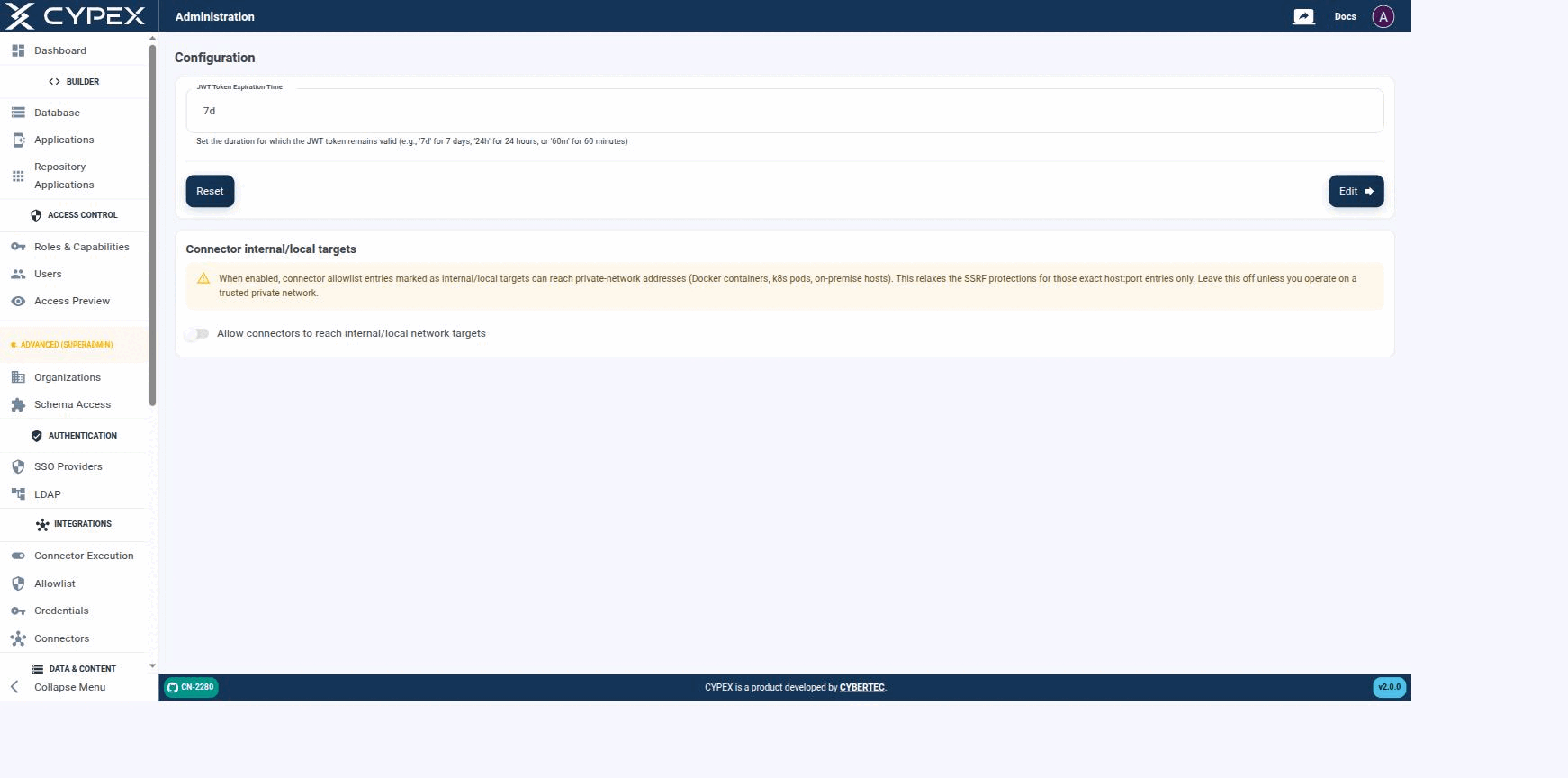
Configuration lives under Platform Admin and holds instance-level settings — these apply to the whole CYPEX deployment, not to a single organization:
Configuration
Session length and Connector internal/local targets are the two instance-wide settings exposed here.
Session length
Sets how long a session stays valid before the user must sign in again, using a duration string — 7d for 7 days, 24h for 24 hours, or 60m for 60 minutes. Click Edit to apply the value shown in the field, or Reset to restore the previous value. It writes cypex.t_config.jwt_exp.
v2.0.0 replaces the single long-lived JWT with an access token / refresh
token pair. This page explains the model, the settings that govern it, and
the two configuration mistakes that break a deployment.
Why it matters
Under the old model a token was minted at login and stayed valid for its whole
lifetime. Deactivating a user or changing their role did nothing until that
token expired — potentially days later.