This is the hands-on companion to Connectors (the architecture reference) and the individual GUI pages under Administration panel → Integrations. It walks through building one connector end to end, using real screenshots and a real (sanitised) request/response captured while writing this guide.
Before you start
Two things must exist before you can even save a connector — the order below is enforced by the backend, not just a suggested reading order:
This is the conceptual / architecture reference. For the hands-on, step-by-step walkthrough with screenshots and a real sanitised request/response, see the Setup guide. For the admin-panel GUI reference (screenshots, field-by-field), see Connectors, Connector Secrets, Connector Allowlist, and Connector Enablement.
Pages in this section
This page — the conceptual / architecture reference.
Setup guide — the hands-on E2E walkthrough: rollout, allowlist, credentials, the guided builder, publish, execute, and audit.
A Connector is a governed, server-side definition for calling a third-party REST API and mapping its response into a typed shape a CYPEX application can render — an authenticated CYPEX user’s page can show a table backed by a live external API call, next to tables backed by CYPEX’s own PostgreSQL data.
Under Integrations → Connector Execution, the page heading is Connector
Execution Rollout. It is a two-step kill switch for connector execution.
Everything is off by default — connectors only run in an organization when
platform-wide execution is on and that organization is included in the
rollout:
Info
Enterprise licence required. Integrations is gated on an active enterprise licence. Without one the section does not appear in the admin sidebar, regardless of the signed-in user’s role.
Under Integrations → Allowlist, the page heading is Connector
Allowlist. It is the set of hosts outbound connectors are permitted to call.
Connectors cannot reach any host that is not allowlisted — this is enforced at
runtime, not just validated at save time:
Info
Enterprise licence required. Integrations is gated on an active enterprise licence. Without one the section does not appear in the admin sidebar, regardless of the signed-in user’s role.
Under Integrations → Credentials, the page heading is Connector
Credentials. Credentials are encrypted at rest and referenced by connectors
by name — never inline. They are write-only: the plaintext value is never
shown again after saving:
Info
Enterprise licence required. Integrations is gated on an active enterprise licence. Without one the section does not appear in the admin sidebar, regardless of the signed-in user’s role.
Under Integrations → Connectors, you build and manage governed REST connectors. A connector is authored as a draft, optionally dry-run against the live provider, then published as an immutable version — editing a published connector creates a new draft, and the live version stays unchanged until you publish again:
Info
Enterprise licence required. Integrations is gated on an active enterprise licence. Without one the section does not appear in the admin sidebar, regardless of the signed-in user’s role.
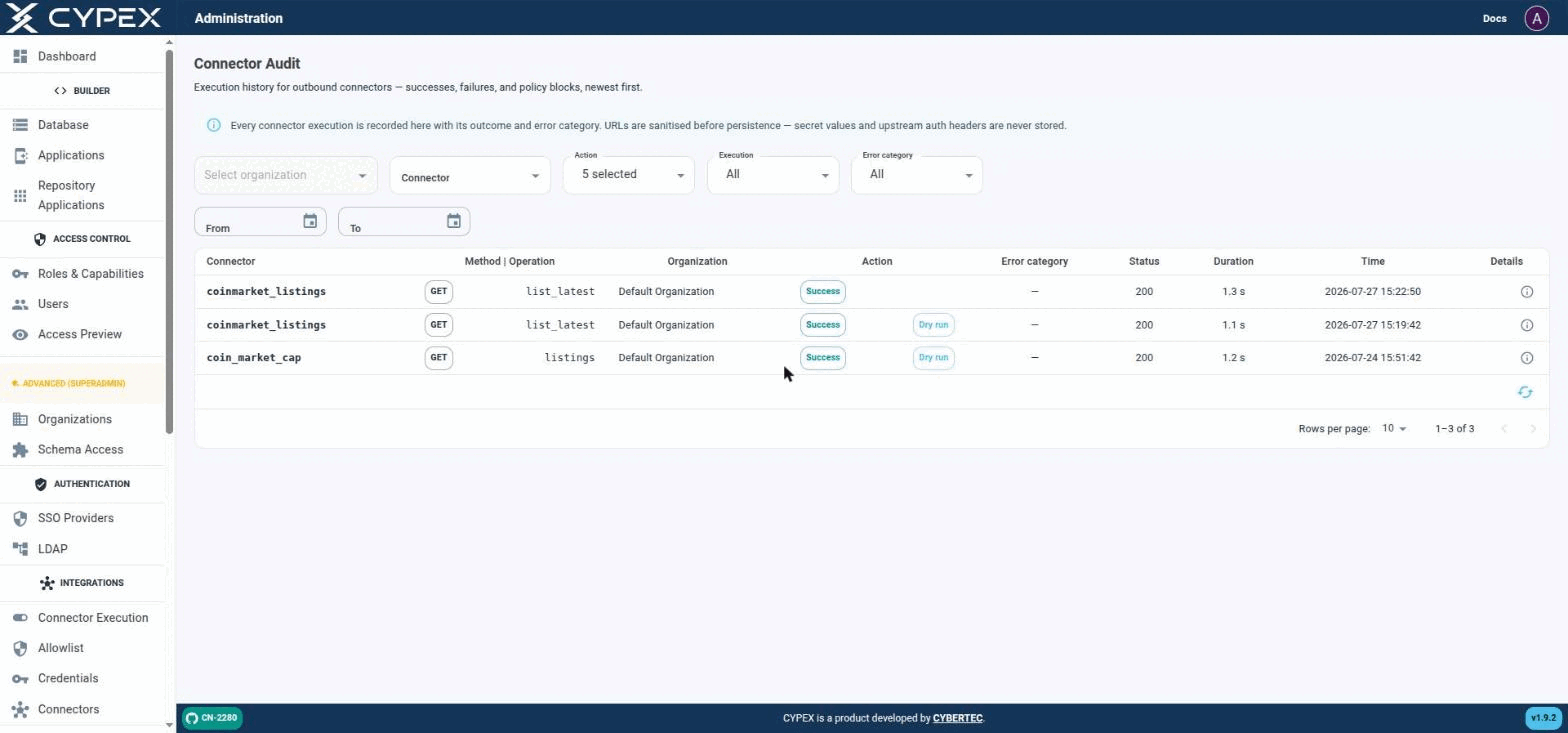
Under Monitor & Audit → Connector Audit, this page is the execution history for outbound connectors — successes, failures, and policy blocks, newest first:
Connector Audit
Live executions (no tag) sit alongside Dry run executions from the builder's Fetch sample / Test response mapping. Both are the same audit trail, distinguished only by the Dry run tag.
Filters
Organization — scope to one tenant.
Connector — scope to one connector definition.
Action — one or more of EXECUTE_STARTED, EXECUTE_SUCCESS, EXECUTE_FAILED, EXECUTE_BLOCKED, EXECUTE_RETRIED, EXECUTE_TIMEOUT.
Execution — All, Live, or Dry run. Dry run covers both the builder’s Fetch sample step and Test response mapping; Live covers real POST /connectors/:id/execute calls.
Error category — filters to one of the categories in Connectors — explicit security boundaries: configuration, schema_validation, policy_block, secret_unavailable, provider_error, timeout, internal.
From / To — date range.
Row details
Each row shows Connector, Method | Operation, Organization, Action (Success/Blocked/etc., plus a Dry run tag when applicable), Error category, Status (HTTP code), Duration, and Time. Click the Details icon for the full record: