The CYPEX administration panel gives operators a single place to administer and manage CYPEX as a whole. v2.0.0 reorganizes it around how operators actually set up and run a multi-tenant deployment. This section is the navigation map for that information architecture: each entry below links to a topic-scoped page documenting the corresponding admin screen.
The table below is the authoritative list of sidebar labels and who sees each one. Labels are the strings the product renders — use them verbatim in procedures.
A single CYPEX deployment can handle a large set of applications running inside the same database. Open Builder → Applications in the sidebar and CYPEX presents a list of every app currently deployed on the system.
You can easily manage your applications from this menu. This includes but isn’t limited to:
- Generating new applications
- Incremental rendering for existing applications
- Launching applications
- Deleting obsolete apps
- Importing entire applications from other systems
Let’s walk through this important page:
CYPEX allows users to define ready-to-use PostgreSQL extensions. Those extensions can be integrated into existing applications to simplify the model creation process and to automate as many steps as possible.
The way external extensions are supported is as follows:
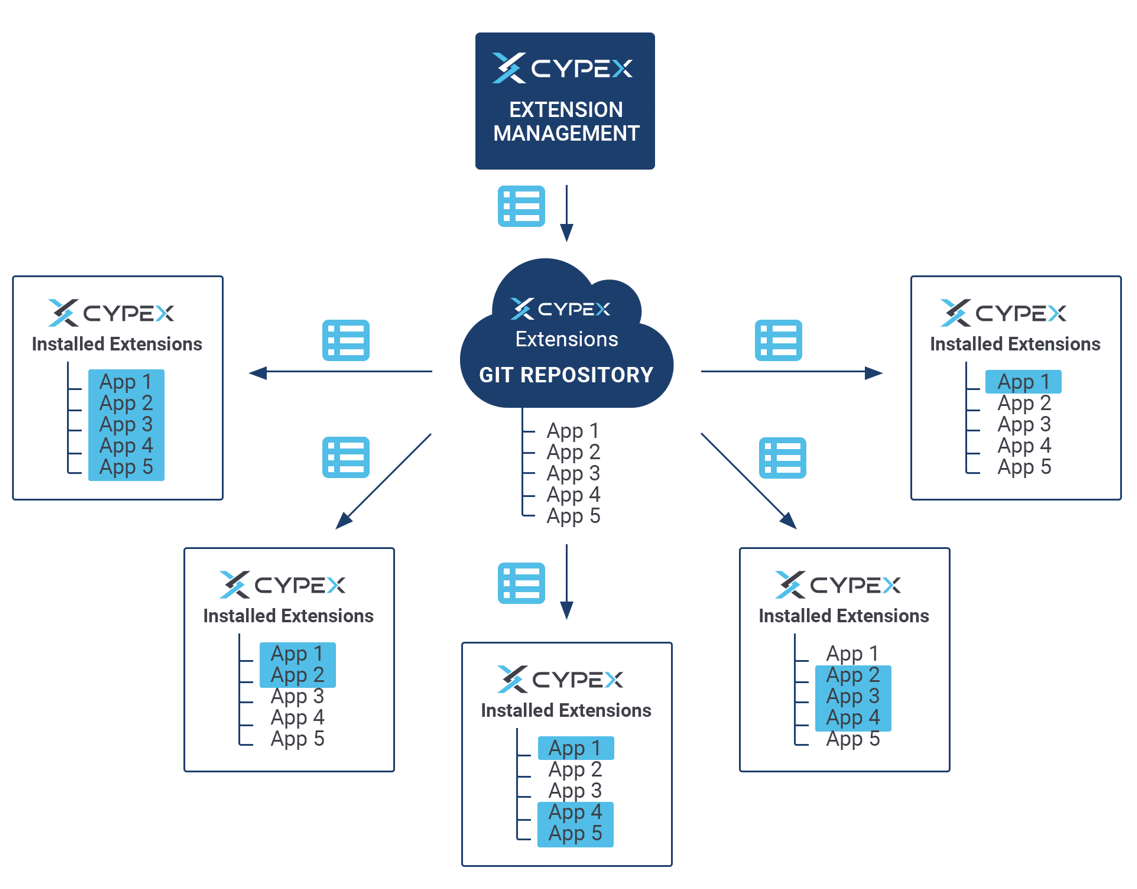
CYPEX allows users to define a set of Git repositories which can be used to fetch extensions. It allows you to deploy everything from small SQL fragments and simple procedures all the way up to full-fledged complex data models.
CYPEX allows multiple developers to work on different applications for the same user Role to avoid conflicts in collaborative development. Since each application is tied to a specific role with access to particular database queries, developers can build separate applications independently.
The Merge Applications feature enables developers/administrators to combine multiple applications built for the same Role into a single, unified application. This process merges all app definitions and concatenates pages, reports, and menu items, ensuring that the final merged application includes all elements from the individual applications.
