This is the hands-on companion to Connectors (the architecture reference) and the individual GUI pages under Administration panel → Integrations. It walks through building one connector end to end, using real screenshots and a real (sanitised) request/response captured while writing this guide.
Before you start
Two things must exist before you can even save a connector — the order below is enforced by the backend, not just a suggested reading order:
This page is the operational counterpart to the conceptual pages in the Administration panel section. It targets operators standing up a CYPEX deployment for the first time.
This page is the mandatory upgrade entry point for CYPEX v2.0.0. It is
written for operators who run CYPEX in production
and need a single walkthrough that covers every breaking change in this
release.
Audience. Read this end-to-end before opening the maintenance window.
It links out to detailed pages for each topic; follow every link in
the order presented.
What is changing in v2.0.0
v2.0.0 introduces seven platform-level changes. Each one is breaking or
behavior-changing for at least one class of deployment.
This is the hands-on companion to SSO (the architecture overview). It walks through adding a real provider, signing in through it, and approving the resulting user — using real screenshots captured against a Generic OIDC provider configured against Google, plus the JWT claim trace that applies to every provider identically.
Before you start
You need the Organizations administrator role for the target organization (or system admin).
The host running the SSO Gateway needs outbound HTTPS to the IdP’s discovery, authorization, token, and JWKS endpoints.
Register the CYPEX callback URL on the IdP side before you save the provider — the default is {app-origin}/auth/{providerType}/callback (e.g. http://localhost:4000/auth/oidc/callback in dev), and the gateway rejects a login whose stored callbackUrl doesn’t match the IdP’s registered redirect URI byte-for-byte.
Step 1 — Add a provider
Under Authentication → SSO Providers → Add provider:
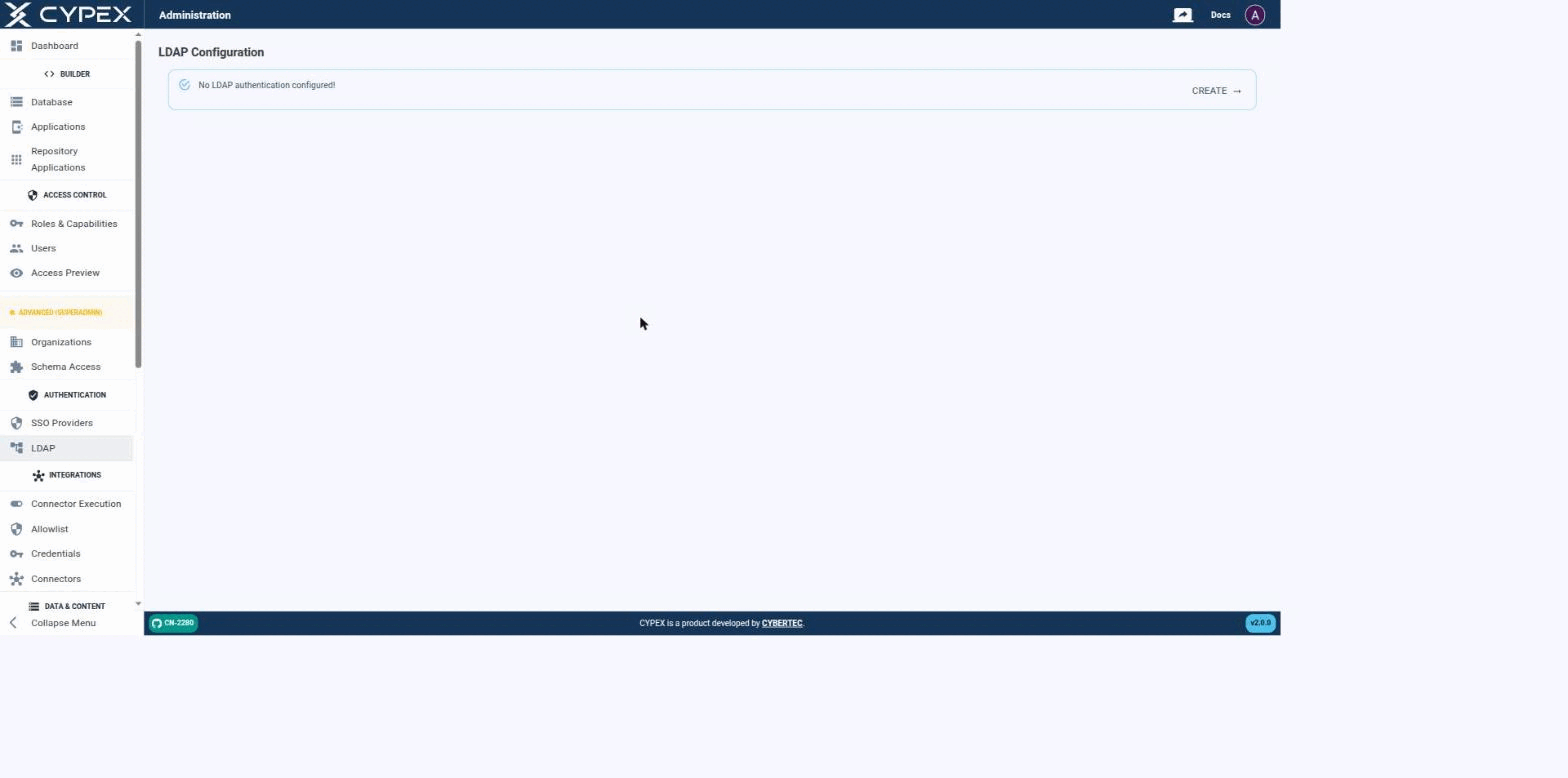
CYPEX authenticates users against an LDAP directory as an alternative to local (integrated) accounts — the same mechanism that backs Microsoft Active Directory, OpenLDAP, and any other LDAP v3 server. Before a connection is configured, the page simply confirms that no LDAP authentication is set up yet:
No LDAP authentication configured
Click CREATE to start the connection form.
Connecting to your directory
Fill out the connection settings to establish a connection between CYPEX and your directory:
This page is the operational counterpart to the conceptual pages in the
Organizations section. It targets operators who run CYPEX, the PostgreSQL
Application Platform, in production and need to perform the four day-to-day
jobs: create, edit, and disable organizations; give users access to an
organization; configure org-scoped application visibility (Schema Access); and
troubleshoot misconfigurations.
For the why behind the model, see the conceptual pages linked below.
Concepts you need first
Read these four pages before walking through the procedures:
Every SSO identity CYPEX has ever seen sits in sso_gateway.t_sso_user_map in exactly one of three states (sso_gateway.user_map_status): pending, active, or rejected. This page documents the full lifecycle — what moves a row between states, what each transition writes to the audit trail, and where to find evidence of a governance decision. For adding a provider and the first successful sign-in, see the OIDC setup guide.
States
State
Meaning
What a repeat login does
Pending
IdP authentication succeeded, but no t_sso_role_mapping rule matched and (if Auto-link by email is off, the default) no admin has reviewed it yet. cypex_user_id and cypex_role are both NULL.
Refreshes the captured profile in place, stays pending. The exchange returns 403 pending_approval — “Your account is pending administrator approval.”
Active
An admin approved or linked the identity, or a role mapping matched automatically. cypex_user_id and cypex_role are set.
Signs in normally; mints an access/refresh token pair like any other login.
Rejected
An admin explicitly rejected the identity. The row is kept (not deleted) — rejected_at, rejected_by, and an optional rejection_reason (≤200 characters) are recorded.
Blocked. The exchange returns 403 user_rejected — a deliberately generic “This SSO identity has been blocked. Contact your administrator.” The real reason and who rejected it never reach the browser; they’re in the audit trail only.
Users → Pending SSO and Users → Rejected SSO are the two admin-facing queues for the states above:
This page is for people who build and ship CYPEX applications. It covers what
changes about that job once a deployment has more than one Organization.
Organization scope on this page is enforced by CYPEX itself, not by the browser.
Hiding a row in the admin panel would be cosmetic; what is described below holds
even for a caller who manipulates the request directly.
Application visibility per organization
The Applications page does
not show every application in the deployment to every admin. A system admin can
pick any organization in the organization filter, or clear it to see everything.
An organization admin is always restricted to their own organization — changing
the filter in the browser does not widen what comes back.
v2.0.0 replaces the single long-lived JWT with an access token / refresh
token pair. This page explains the model, the settings that govern it, and
the two configuration mistakes that break a deployment.
Why it matters
Under the old model a token was minted at login and stayed valid for its whole
lifetime. Deactivating a user or changing their role did nothing until that
token expired — potentially days later.